Monday, January 30, 2012

Doodle 4 Google

Day 5
Day 1 
Sketch
Day 2

Day 4

Day 3
For this project we were to recreate the Google's homepage logo with the theme of "If I could travel in time, I'd visit..." Computer drawing/design software was one of the mediums we could use to create our doodle so we used Adobe Illustrator CS3. The time I chose was around 1300 C.E., during the time of one of my favorite civilizations:  The Aztecs. I incorporated many things from their culture into my doodle. The capital G was a headdress with feathers, the first o was a symbol for flower, and the second o and g were the ball and hoop of the Aztec ball game. Maize, or corn, was one of their staple crops so the l was made into an ear of corn. Then the e was a jaguar as portrayed in their art, the wild cat being a symbol of strength and power. In the background there is a temple and a sun peeking out from behind it. I used gradients in both the ear of corn and the sun to given them dimension. Lines were used to create all of the objects, especially the pyramid to show the many blocks of stone that would've been used to make the real thing. There is unity between all these objects in that they all relate back to the time and place in which I planned. My final design is a bit changed from my sketch. I changed a few items such as the human heart for the symbol and the corn in place of the weapon.

Wednesday, January 18, 2012

mySelf


Day 1 - Sketch

Day 2
Day 3
Day 5 - Final Design

Day 4


In this project we were to create a self illustration using different objects that reflect our interests and personality. Just as with the previous self illustration project, we were to work in Adobe Illustrator CS3. My design included me with curly hair; vines, a strand of rosary beads, as well as makeup brushes serving as different strands of hair. The nail polish brush and different bands of color are straps of a top. My nose is made up of feathers and my mouth is a cupcake. The eyes feature one with a pokeball, the other with  the sign of Gemini,  Sneasel feathers for eyelashes, and penguin footprints for eyebrows. By making the different facial features proportional in size I hoped to make it more realistic. Using gradients allowed me to create a three dimensional effect. The variety of colors used are from my love of color and lines were used to create the different objects. My final product resembles my sketch. Only a few details were changed such as the placement of vines, the use of the feathers as the left shoulder straps.

Tuesday, January 10, 2012

Day 1 - Sketch

Day 2 

Day 3

Final Design


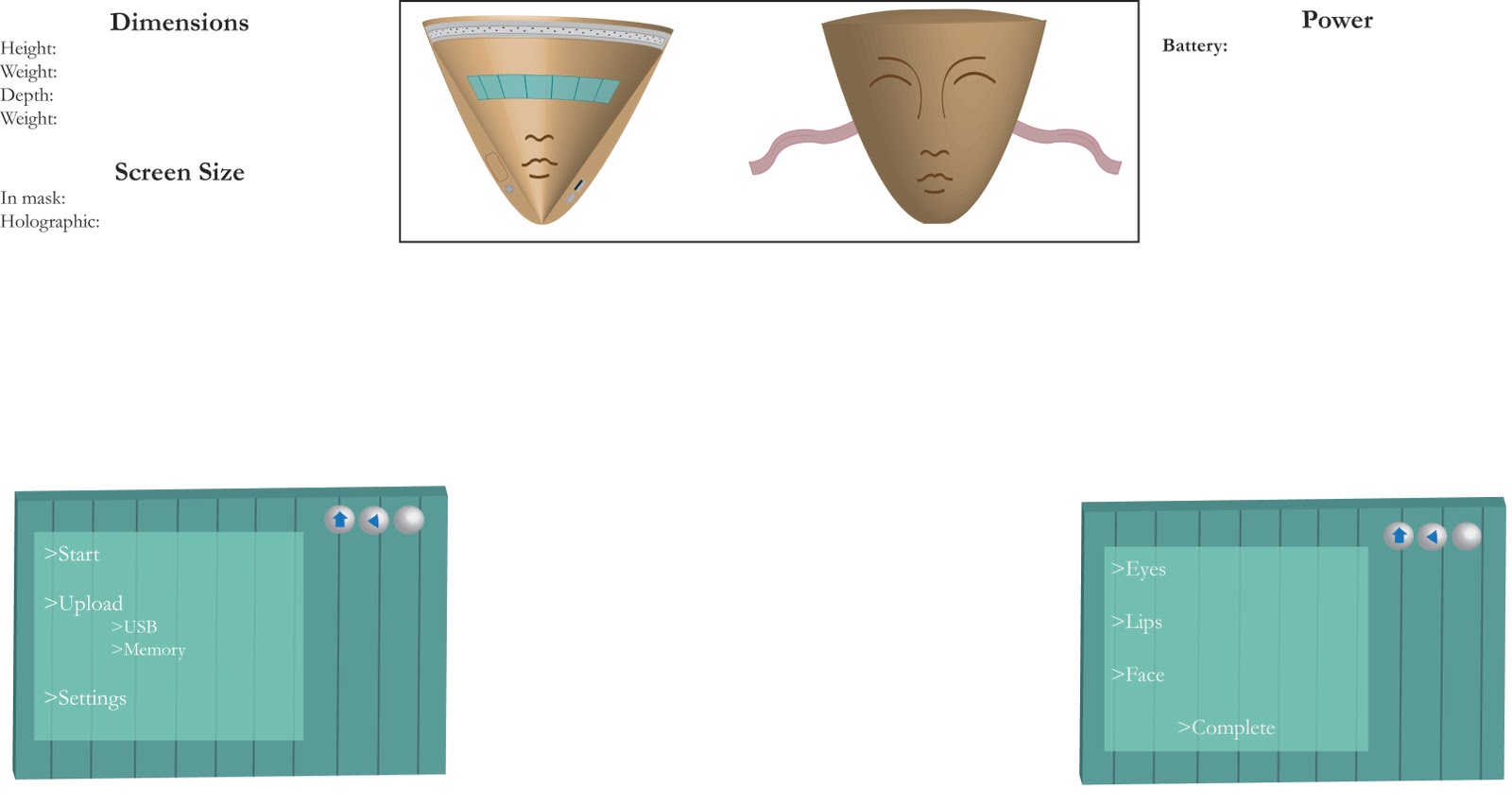
In this project we were to use Adobe Illustrator CS3 to create a 3D rendering of a product we have invented. We were to use our knowledge of 3D effects such as Revolve and Extrude & Bevel. The art mapping option enabled us to map a 2D design to the surface of a 3D object. My product was inspired by an invention in a movie. It is a mask that can do a full face of makeup with just the push of a few buttons. The mask is intended to cover the whole face, with a screen being visible once on. The shape of the mask was to mimic the shape of a real person's face, with the features of the face on the front. I made the size of the facial features proportional and similar to a real face. The gradation created by using the 3D effect made the mask look more realistic. My sketch was much simpler than my final product. The details were thought of but added onto the project as I worked on it. 

Friday, December 16, 2011

myIPOD

Day 1 - Sketch

Final Design
Day 2


For this project we had to create an Ipod and skin for it in Adobe Illustrator CS3. We were to make it as realistic as possible and create a custom skin. My final product is a winter themed Ipod nano. I created the igloo using lines and made it a brighter white color to contrast with the blue background. The igloo spans around the Ipod, it can be seen from the front, the side, and the back. To go along with the winter theme, I made snowflakes in a variety of sizes and placed them around the surface of the Ipod. My final design accurately represents my sketch in that it has almost all of the components I originally drew.

Monday, December 12, 2011

MySpace

Day 3
Sketch
Day 2
Final Design
In this project we were to use the lamp that we created in the previous project and create a space for it using Adobe Illustrator CS3. Once again, we used different 3D effects in order to make our space and objects look more realistic. The lamp that I created before was a birdcage, I got inspired by vintage European furniture. To go along with the lamp, I created a dress form, a vanity table, and a chair. Using gradients on the area around my lamps, I made it look as though they were on and giving off a soft glow. Using the Bevel & Extrude effect, I was able to make the vanity table have a more three dimensional shape as well as the little jewelry box. The dress form and chair were given there shape and smooth texture by using the Revolve effect. My final design, for the most part, accurately represents my sketch. The added details were the shadows of the furniture in the room and the jewelry box with its reflection in the mirror.